Every day, cybercriminals send millions of fraudulent emails impersonating legitimate brands. For IT professionals and email marketers alike, protecting your domain’s reputation while ensuring reliable inbox placement isn’t optional — it’s mission-critical infrastructure. DKIM authentication stands as one of your most powerful defenses against email spoofing, message tampering, and deliverability failures.
In this comprehensive guide, we’ll break down exactly how DKIM works, why it’s essential for both security and deliverability, how to set it up correctly, and how to verify your implementation is functioning as intended.
DomainKeys Identified Mail (DKIM) is an email authentication protocol that allows a receiving mail server to verify that an email claiming to come from a specific domain was genuinely authorized by that domain’s owner. Equally important, it confirms that the message content wasn’t altered during transit between the sender and recipient.
DKIM accomplishes this through cryptographic signatures embedded in email headers. When properly configured, a DKIM signature serves as a tamper-proof digital seal of authenticity that mailbox providers — Gmail, Microsoft 365, Yahoo, and others — use to evaluate whether your messages deserve inbox placement or should be filtered as suspicious.
Unlike SPF (which validates the sending server’s IP address), DKIM validates the message itself. This distinction is critical: DKIM protection survives email forwarding, whereas SPF often breaks when messages are relayed through intermediate servers.
Major inbox providers have made authentication non-negotiable. Google and Yahoo’s 2024 sender requirements explicitly mandate DKIM for bulk senders, and in 2026, these requirements have only become stricter. Emails without valid DKIM signatures face significantly higher spam placement rates, reduced engagement metrics, and potential outright rejection.
DKIM contributes directly to your domain’s sender reputation. Mailbox providers track whether your authenticated emails generate complaints, bounces, or engagement — building a reputation profile tied to your signing domain. A strong DKIM track record translates directly into better inbox placement.
Without DKIM, anyone can forge emails that appear to come from your domain. Attackers routinely impersonate brands for phishing campaigns, invoice fraud, and credential harvesting. DKIM makes this impersonation detectable by receiving servers, and when combined with DMARC enforcement, it allows you to instruct mailbox providers to reject unauthorized messages entirely.
The brand damage from a successful impersonation attack extends far beyond the immediate phishing incident — customer trust, regulatory scrutiny, and business relationships all suffer when your domain appears in fraudulent communications.
Understanding DKIM explained at the technical level requires grasping asymmetric (public-key) cryptography. The concept is more straightforward than it sounds.
DKIM relies on a matched pair of cryptographic keys:
The mathematical relationship between these keys ensures that only emails signed with your private key will successfully validate against your public key. Reversing the process — deriving the private key from the public key — is computationally infeasible with current key lengths (2048-bit RSA is the recommended minimum).
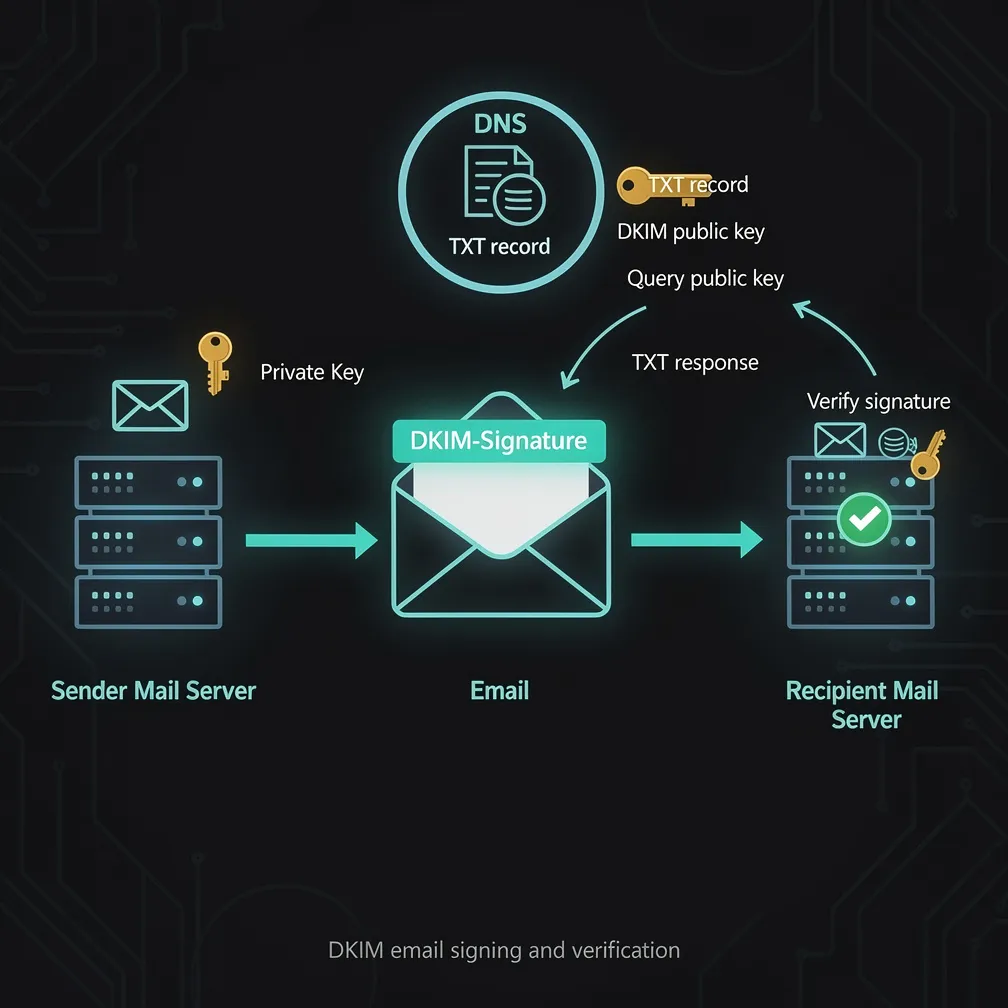
When your mail server sends an email with DKIM enabled, this sequence occurs:
DKIM-Signature header field before transmission.Here’s what a real DKIM signature looks like in email headers:
DKIM-Signature: v=1; a=rsa-sha256; c=relaxed/relaxed;
    d=yourdomain.com; s=selector1;
    h=from:to:subject:date:message-id:mime-version;
    bh=2jUSOH9NhtVGCQWNr9BrIAPreKQjO6Sn7XIkfJVOzv8=;
    b=AuUoFEfDxTDkHlLXSZEpZj79LICEps6eda7W3deTVFOk2P
      oIoOH4sSAGBVwGZw2Ao4Om8UvjQ1iF2bGe/R6CR0k...
Key parameters explained:
Your DKIM public key is published as a DNS TXT record at a specific subdomain following this pattern:
[selector]._domainkey.[yourdomain.com]For example, with selector “mail” and domain “yourdomain.com”:
mail._domainkey.yourdomain.com IN TXT "v=DKIM1; k=rsa; p=MIIBIjANBgkqhkiG9w0BAQEFAAOCAQ8AMIIBCgKCAQEA..."The record contains:
Selectors allow you to maintain multiple active DKIM keys simultaneously — useful for key rotation, using different keys for different mail streams, or transitioning between email service providers without downtime.
Implementation varies by mail infrastructure, but the core steps remain consistent:
Most email service providers (ESPs) generate DKIM keys for you automatically. If you’re managing your own mail server, generate a 2048-bit RSA key pair using OpenSSL:
openssl genrsa -out dkim_private.pem 2048
openssl rsa -in dkim_private.pem -pubout -out dkim_public.pemCreate a TXT record at your chosen selector subdomain. If your ESP provides the record value, copy it exactly. Common mistakes include:
Install the private key on your sending infrastructure and configure DKIM signing. For common platforms:
Send test emails to verification services and confirm the DKIM signature validates. Never assume DNS propagation is complete — allow 24-48 hours for global propagation before relying on DKIM for production mail.
Once configured, you need to confirm your DKIM signatures are validating correctly on the receiving end.
Send an email to a Gmail or Outlook account. Open the message, view the full headers (or “original message”), and look for:
Authentication-Results: mx.google.com;
    dkim=pass header.d=yourdomain.com header.s=selector1
A dkim=pass result confirms your signing and DNS configuration are correct.
Several free tools can validate your DKIM DNS records directly:
If you have DMARC configured (which you should), your aggregate reports will show DKIM pass/fail rates across all messages sent from your domain. A sudden spike in DKIM failures indicates either a configuration problem, key expiration, or unauthorized senders attempting to use your domain.
| Symptom | Likely Cause | Resolution |
|---|---|---|
dkim=neutral (body hash did not verify) |
Message modified in transit (mailing list, footer injection) | Use l= tag cautiously, or sign only headers for those streams |
dkim=temperror (DNS query timed out) |
DNS hosting issues or propagation delay | Verify TXT record exists via dig or nslookup |
dkim=permerror (key too short) |
Using deprecated 512 or 1024-bit key | Regenerate with 2048-bit RSA minimum |
dkim=fail (signature verification failed) |
Private/public key mismatch or wrong selector | Confirm selector matches DNS record name |
d= domain in your DKIM signature should align with your From: header domain for DMARC alignment.DKIM is one pillar of a three-part email authentication framework:
Together, these three protocols provide comprehensive protection against domain spoofing and give you visibility into who is sending email on behalf of your domain. Implementing DKIM without DMARC leaves a critical gap — you can sign your emails, but you can’t instruct receivers to reject unsigned forgeries.
DKIM authentication is no longer optional for any organization that sends email. Whether you’re managing transactional notifications, marketing campaigns, or internal communications, a properly configured DKIM signature protects your brand from impersonation, improves your deliverability, and gives mailbox providers the confidence to route your messages to the inbox.
The setup investment is minimal compared to the ongoing protection it provides. Generate your keys, publish your DNS record, configure signing, and verify it’s working. Your domain reputation — and your recipients’ security — depend on it.