Email authentication has become non-negotiable in today’s threat landscape, yet many organizations struggle with a critical component that determines whether their DMARC implementation actually protects their domain: alignment. You can have perfectly configured SPF and DKIM records, but without proper DMARC alignment, your authentication fails. Understanding how DMARC alignment works is essential for email administrators who need to ensure legitimate messages reach inboxes while preventing domain spoofing attacks.
DMARC alignment, formally defined in RFC 7489 as “identifier alignment,” is the mechanism that ties SPF and DKIM authentication results to the domain visible to end users in their email client. The critical concept is that DMARC requires the domain in the From header—what recipients actually see—to align with the domain authenticated by either SPF or DKIM.
This distinction matters because SPF and DKIM authenticate different identifiers. SPF authenticates the envelope sender (the domain used during SMTP transmission), while DKIM signs the message with a domain specified in the signature. Neither of these necessarily matches the From header domain that users see. DMARC bridges this gap by requiring alignment between these authenticated domains and the visible From domain.
Here’s the crucial point many administrators miss: passing SPF or DKIM authentication alone is insufficient for DMARC to pass. An email must pass SPF or DKIM authentication AND achieve alignment between the authenticated domain and the From header domain. Without this alignment, DMARC fails regardless of authentication success, and the email is subject to the domain’s DMARC policy enforcement.
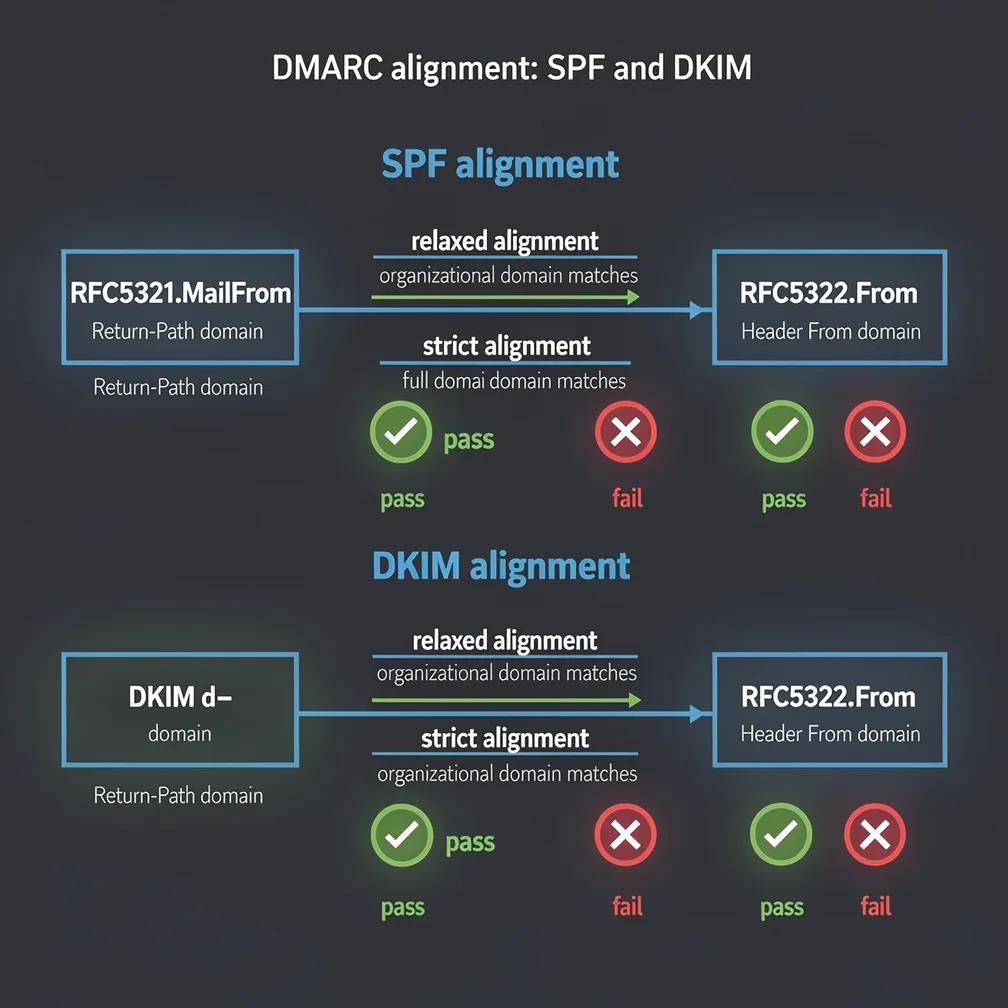
DMARC provides two alignment modes that determine how strictly the domains must match: relaxed and strict. These modes are controlled by the aspf tag for SPF alignment and the adkim tag for DKIM alignment in your DMARC record.
Relaxed alignment (r) requires that the organizational domain matches, allowing subdomain flexibility. If your From header uses example.com, relaxed alignment accepts authentication from mail.example.com or newsletter.example.com. Strict alignment (s) requires an exact domain match—no subdomain variations are accepted.
Here are DMARC record examples demonstrating both modes:
Relaxed alignment (default): v=DMARC1; p=quarantine; aspf=r; adkim=r; rua=mailto:[email protected]
Strict alignment: v=DMARC1; p=quarantine; aspf=s; adkim=s; rua=mailto:[email protected]
Most organizations should start with relaxed alignment, which is the default if you don’t specify aspf or adkim tags. Strict alignment is appropriate for high-security environments or organizations with simple email infrastructures where all mail originates from a single domain without subdomains. However, strict alignment can break legitimate email flows if you use subdomains for different mail streams or services.
SPF alignment for DMARC compares two specific domain identifiers: the RFC5321.MailFrom domain (also called the envelope sender or Return-Path) against the RFC5322.From domain (the header From address visible to recipients).
When an email is transmitted, the envelope sender is specified during the SMTP transaction with the MAIL FROM command. This is separate from the From header that appears in the message content. For dmarc spf alignment to pass, these domains must align according to your alignment mode.
Pass example with relaxed alignment:
Fail example with strict alignment:
Fail example with relaxed alignment:
This last scenario is common when using third-party email services that send from their own infrastructure without custom envelope domains.
DKIM alignment for DMARC compares the d= domain parameter in the DKIM signature header against the RFC5322.From domain. The d= domain identifies which domain is taking responsibility for the message through its cryptographic signature.
For dmarc dkim alignment to succeed, the signing domain (d= value) must align with the From header domain according to your alignment mode. DKIM alignment offers a significant advantage over SPF alignment: it survives email forwarding because the DKIM signature travels with the message content rather than relying on the SMTP envelope.
Pass example with relaxed alignment:
Fail example with strict alignment:
Pass example with strict alignment:
Because DKIM alignment maintains integrity through forwarding, many security professionals prioritize achieving DKIM alignment over SPF alignment when both aren’t feasible.
Understanding how dmarc alignment handles subdomains is critical for organizations with complex email infrastructures. Relaxed alignment treats subdomains and parent domains as aligned if they share the same organizational domain, while strict alignment treats them as separate entities.
With relaxed alignment, these scenarios pass:
All share the organizational domain example.com, so relaxed alignment succeeds. With strict alignment, all these scenarios would fail because the domains don’t match exactly.
The practical implications are significant. Organizations often use subdomains to segregate different mail streams—marketing emails from marketing.example.com, transactional emails from app.example.com, and corporate emails from example.com. Relaxed alignment accommodates this architecture seamlessly. Strict alignment would require each subdomain to authenticate using its exact domain, complicating infrastructure and potentially breaking legitimate mail flows.
Additionally, many third-party services send email from subdomains of your domain while authenticating with their own subdomain infrastructure. Relaxed alignment supports these configurations, while strict alignment often breaks them unless specifically configured.
Alignment failures are among the most common DMARC implementation challenges. Understanding typical causes helps administrators quickly diagnose and resolve issues.
Third-party senders using their own envelope domain is the most frequent culprit. Email service providers often send from their infrastructure using their domain as the envelope sender, causing SPF alignment to fail. The solution requires either custom envelope domains (often called custom Return-Path) or ensuring DKIM alignment with proper d= domain configuration.
DKIM signing with the wrong d= domain occurs when email services sign messages with their own domain rather than yours. Many platforms default to signing with their domain. You must explicitly configure them to sign with your domain to achieve DKIM alignment.
Misconfigured forwarding breaking SPF alignment happens because forwarded messages retain the original envelope sender while being transmitted from a different server. The forwarding server’s IP address won’t match the original domain’s SPF record, causing SPF authentication to fail. DKIM alignment typically survives forwarding, making it the preferred authentication method for messages that may be forwarded.
DMARC aggregate reports are your primary diagnostic tool for identifying alignment failures. These XML reports, sent by receiving mail servers, detail authentication and alignment results for all messages claiming to be from your domain. Analyzing these reports reveals which sending sources fail alignment and why. Email Delivery Pro provides tools to parse and visualize these reports, making troubleshooting significantly easier. For comprehensive guidance on policy configuration, review our DMARC policy configuration technical guide.
Implementing DMARC alignment successfully requires following proven practices that minimize disruption while maximizing security:
To compare different DMARC monitoring and alignment tools, visit our comparison page for detailed feature analysis.
DMARC alignment is the bridge between technical authentication mechanisms and user-visible email identifiers. While SPF and DKIM provide the cryptographic foundation for email authentication, alignment ensures these mechanisms actually protect the domain recipients see in their inbox. Understanding the nuances of SPF alignment, DKIM alignment, relaxed versus strict modes, and subdomain handling enables email administrators to implement DMARC effectively without disrupting legitimate mail flows.
Success requires methodical implementation: start with relaxed alignment and p=none policy, comprehensively identify all sending sources, ensure third-party services support proper alignment, and use aggregate reports to verify configuration before enforcement. At Email Delivery Pro, we’ve seen organizations transform their email security posture by mastering these alignment principles, reducing spoofing attempts while maintaining high deliverability for legitimate messages. The investment in understanding and properly configuring DMARC alignment pays dividends in both security and email program performance.