When a system administrator troubleshoots email deliverability issues, the focus often gravitates toward SPF, DKIM, and DMARC records. While these authentication mechanisms are undeniably critical, there’s another DNS component that frequently flies under the radar yet plays a fundamental role in establishing sender reputation: reverse DNS lookups and PTR records. If you’re managing email infrastructure and haven’t properly configured your reverse DNS email settings, you may be silently undermining your delivery rates without realizing it.
Mailbox providers perform numerous checks during the SMTP handshake process, and reverse DNS verification is one of the earliest gates your email must pass through. A missing, misconfigured, or suspicious PTR record can trigger red flags before your message content is even evaluated. This technical deep-dive examines what reverse DNS is, how PTR records function within email delivery workflows, and why proper rDNS setup should be a non-negotiable component of your mail server configuration.
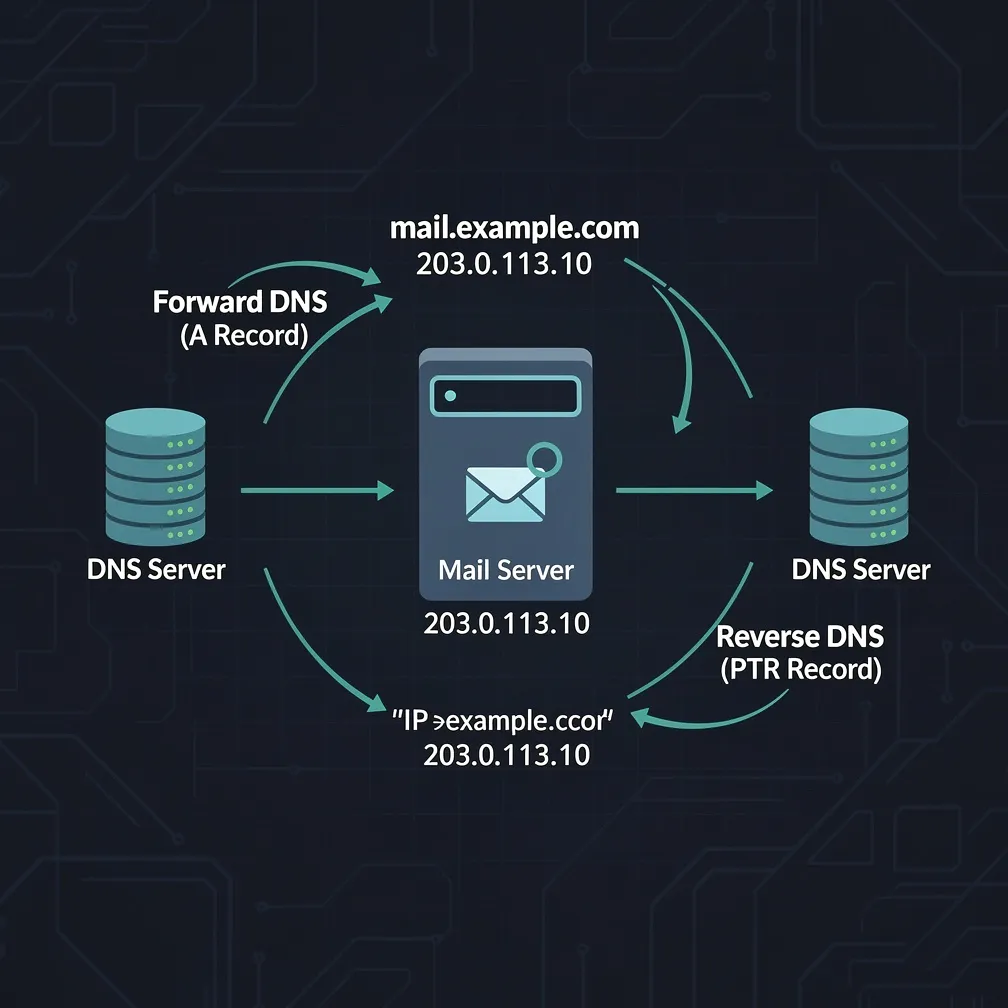
Standard DNS resolution translates human-readable domain names into IP addresses—a forward lookup. When you query example.com, DNS returns its associated IP address, such as 192.0.2.1. Reverse DNS performs the opposite operation: it resolves an IP address back to a hostname.
This reverse mapping is accomplished through PTR (pointer) records stored in special reverse DNS zones. These zones exist within the in-addr.arpa domain hierarchy for IPv4 addresses and ip6.arpa for IPv6 addresses. For instance, the reverse DNS zone for IP address 192.0.2.1 would be queried as 1.2.0.192.in-addr.arpa.
Unlike forward DNS records, which domain owners control through their DNS provider, PTR records must be configured by whoever controls the IP address allocation—typically your hosting provider, ISP, or data center. This distinction is crucial because it means you cannot simply add a PTR record to your domain’s DNS zone file; you must coordinate with your IP address provider to establish the reverse DNS mapping.
When your mail server initiates an SMTP connection to deliver email, the receiving mail server immediately knows your IP address. Before accepting the message, most mailbox providers perform a reverse DNS lookup on that IP address as part of their initial sender validation process.
The typical verification sequence unfolds as follows:
This bidirectional verification—often called forward-confirmed reverse DNS (FCrDNS)—establishes that the IP address and hostname have a legitimate, intentional relationship. It’s a basic trust signal that indicates professional mail server configuration rather than a compromised machine or temporary infrastructure.
Major mailbox providers including Gmail, Microsoft 365, Yahoo, and others incorporate reverse DNS checks into their filtering algorithms. While a proper PTR record alone won’t guarantee inbox placement, its absence or misconfiguration can contribute to your mail being flagged as suspicious, particularly when combined with other negative signals.
Since PTR records must be configured by the entity controlling your IP address allocation, the setup process varies depending on your infrastructure arrangement. Here are the common scenarios:
Dedicated Server or VPS Hosting: Most hosting providers offer a control panel interface or support ticket system for requesting PTR record changes. You’ll typically need to specify the IP address and the desired hostname. Some providers allow self-service PTR management through their customer portal.
Cloud Infrastructure (AWS, GCP, Azure): Cloud providers generally offer APIs and console interfaces for managing reverse DNS. In AWS, for example, you can configure PTR records through the EC2 console or CLI when you have an Elastic IP address. The process usually requires that the forward DNS record already exists and points to the IP address.
Colocation or Dedicated IP Blocks: If you control your own IP address space, you’ll need to configure PTR records through your DNS hosting provider that manages your reverse DNS zones, or through your upstream provider if they maintain the reverse zones.
The hostname you specify in your PTR record should match the hostname your mail server uses in its SMTP HELO/EHLO command. Best practices include:
After configuring your PTR record, verification is essential. DNS propagation can take anywhere from minutes to hours depending on TTL values and caching, so allow adequate time before testing.
The most straightforward verification method uses command-line DNS query tools. Here’s how to check your rDNS setup using common utilities:
Using dig (Linux/Unix/macOS):
dig -x 203.0.113.50This performs a reverse DNS lookup on the specified IP address. Look for the ANSWER SECTION in the output, which should display your PTR record:
;; ANSWER SECTION:
50.113.0.203.in-addr.arpa. 3600 IN PTR mail.yourdomain.com.
Using nslookup (Windows/cross-platform):
nslookup 203.0.113.50The response should show:
Name: mail.yourdomain.com
Address: 203.0.113.50
Using host (Linux/Unix/macOS):
host 203.0.113.50Expected output:
50.113.0.203.in-addr.arpa domain name pointer mail.yourdomain.com.After confirming the PTR record exists, verify forward-confirmed reverse DNS by performing a forward lookup on the returned hostname:
dig mail.yourdomain.comThe A record should resolve back to your original IP address (203.0.113.50). This bidirectional match is what receiving mail servers verify during their FCrDNS checks.
Several recurring problems plague reverse DNS configurations, often without the administrator’s immediate awareness:
Mismatched PTR and A Records: The most frequent issue occurs when the PTR record points to a hostname, but that hostname’s A record points to a different IP address (or doesn’t exist at all). This FCrDNS failure immediately raises suspicion with receiving mail servers. Always ensure your forward and reverse DNS records create a complete loop.
Generic ISP or Hosting Provider Hostnames: If you haven’t configured a custom PTR record, your IP address may have a default reverse DNS entry from your provider, such as 203-0-113-50.static.hosting-provider.net or similar generic patterns. These hostnames signal that you haven’t properly configured your mail infrastructure and can negatively impact deliverability. Mailbox providers know these patterns are often associated with compromised servers or amateur setups.
Multiple IP Addresses Without Corresponding PTR Records: If your mail server uses multiple IP addresses for outbound mail (common in high-volume environments), each IP address must have its own properly configured PTR record. Overlooking even one IP in your pool can create inconsistent deliverability patterns.
PTR Record Pointing to Wrong Domain: Some administrators mistakenly configure the PTR record to point to their primary website domain rather than a mail-specific subdomain. While this may technically pass FCrDNS checks, best practice dictates using a dedicated mail hostname that matches your SMTP banner.
IPv6 Reverse DNS Neglect: As IPv6 adoption increases, administrators sometimes configure IPv4 PTR records while forgetting their IPv6 addresses. If your mail server has IPv6 connectivity and sends mail over IPv6, those addresses need PTR records in the ip6.arpa zone structure.
The consequences of improper reverse DNS email configuration extend beyond theoretical best practices—they manifest in measurable deliverability degradation.
Mailbox providers use reverse DNS as part of their sender reputation assessment. While it’s rarely the sole determining factor for inbox placement, it functions as a foundational trust signal. A missing or mismatched PTR record contributes to a negative sender profile, particularly when combined with other risk factors such as:
In isolation, a proper PTR record won’t rescue poor sending practices, but its absence can prevent even legitimate mail from getting a fair evaluation. Some receiving servers are configured to reject or defer connections from IP addresses without valid reverse DNS entries during the SMTP handshake—before your authentication records are even checked.
The impact is particularly pronounced for new mail servers establishing reputation. During this critical ramp-up phase, every trust signal matters. A properly configured rDNS setup demonstrates technical competence and intentional infrastructure design, helping differentiate your legitimate mail server from the vast landscape of compromised machines and spam sources.
For established senders, reverse DNS issues may not cause immediate catastrophic failures but can contribute to gradual reputation erosion, reduced inbox placement rates, and increased filtering scrutiny. The technical debt of improper PTR configuration accumulates over time, making it harder to diagnose deliverability problems when they emerge.
Reverse DNS configuration occupies a unique position in email infrastructure—it’s technically straightforward yet frequently overlooked, and while not independently decisive for deliverability, its proper implementation is foundational to sender reputation.
For system administrators managing email infrastructure, here are the actionable takeaways:
At Email Delivery Pro, we recognize that email deliverability depends on getting hundreds of technical details right. Reverse DNS represents one of those details that seems minor until its absence creates problems. By treating PTR record configuration as a mandatory component of mail server setup rather than an optional enhancement, you establish the technical foundation that mailbox providers expect from legitimate, professional email senders.
Take thirty minutes today to verify your reverse DNS configuration. The investment in proper rDNS setup pays ongoing dividends in deliverability performance and operational reliability.