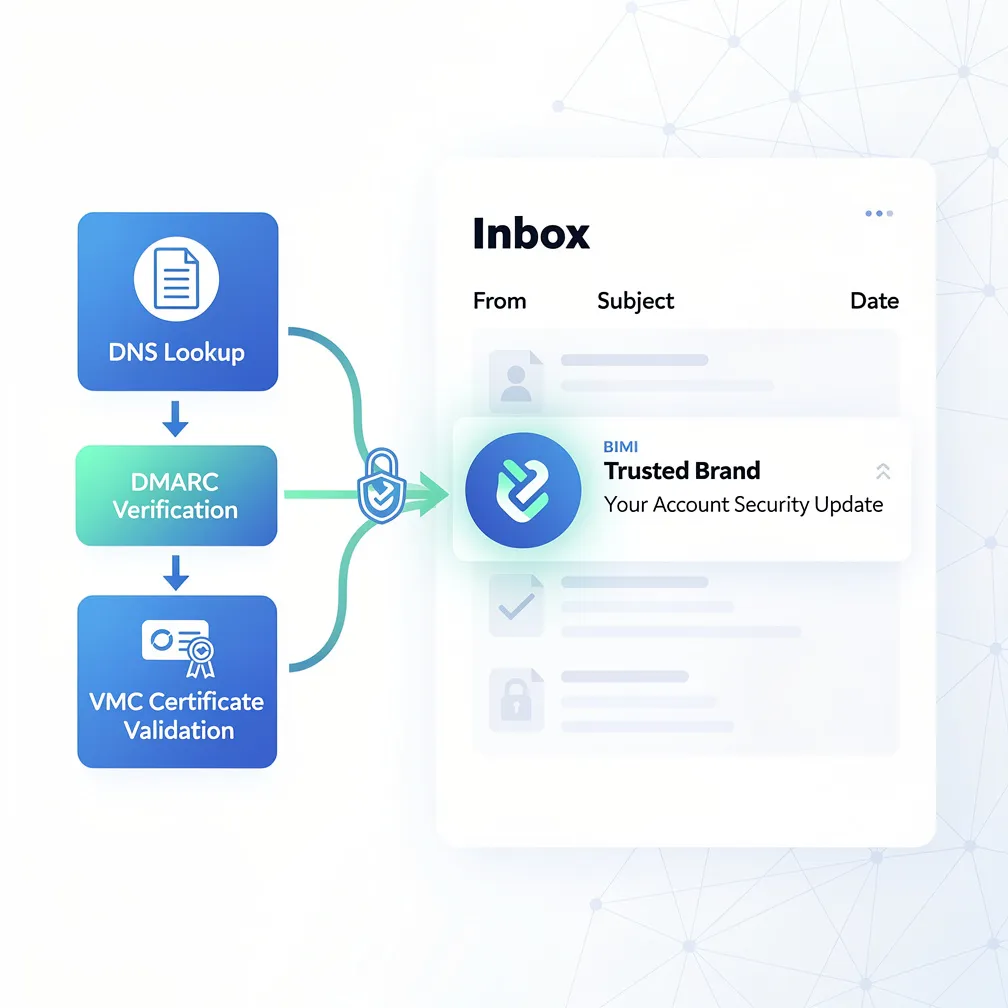
In today’s crowded inboxes, standing out from competitors and building trust with recipients has never been more challenging. Email marketing managers face the dual challenge of increasing open rates while protecting their brand from phishing attacks and impersonation. Brand Indicators for Message Identification (BIMI) offers a powerful solution by displaying your verified brand logo directly in the inbox, creating immediate visual recognition and trust. This comprehensive guide will walk you through everything you need to know about BIMI implementation, from technical requirements to step-by-step deployment.
Brand Indicators for Message Identification, commonly known as BIMI, is an emerging email specification that enables organizations to display their brand logo next to authenticated messages in recipients’ inboxes. When properly implemented, BIMI email authentication allows your company’s logo to appear as a visual indicator alongside your email messages in supported email clients, creating instant brand recognition before the recipient even opens the message.
The BIMI standard was developed by the AuthIndicators Working Group, a collaboration between industry leaders including Google, Yahoo, Fastmail, and other major email providers. The specification emerged from the need to give legitimate senders a way to visually differentiate their messages from phishing attempts and fraudulent emails. By tying logo display to strong email authentication protocols, BIMI creates a trusted visual ecosystem where recipients can quickly identify genuine brand communications.
The primary purpose of BIMI extends beyond aesthetics. It serves as a trust signal that confirms you’ve implemented robust email authentication, verified your trademark ownership, and met stringent security requirements. This combination of visual branding and security validation makes BIMI a powerful tool for both marketing impact and brand protection.
Understanding the technical process behind BIMI implementation helps clarify why certain requirements exist and how mailbox providers validate your brand logo for display.
When you send an email, the receiving mailbox provider performs several authentication checks before considering logo display. First, the provider validates your email against SPF, DKIM, and DMARC protocols. If your message passes DMARC authentication with proper alignment, the mailbox provider then performs a DNS TXT record lookup for your BIMI assertion record.
The BIMI assertion record is published in your DNS at a specific location, typically at default._bimi.yourdomain.com. This record contains two critical pieces of information: the location of your SVG logo file and the location of your Verified Mark Certificate (VMC). The record follows a specific format with tags that define each element.
Once the mailbox provider retrieves your BIMI record, it validates the VMC to confirm your trademark ownership and logo authenticity. If all validations pass—DMARC authentication, proper BIMI record format, valid VMC, and compliant logo file—the provider downloads your logo and displays it in the recipient’s inbox alongside your message. This entire process happens automatically in milliseconds during email delivery.
Implementing brand indicators for message identification requires meeting several technical and legal prerequisites. These requirements ensure that only legitimate, authenticated senders can display logos in inboxes.
DMARC enforcement stands as the foundational requirement. Your domain must have a DMARC policy set to either p=quarantine or p=reject. A policy of p=none is insufficient for BIMI. This enforcement level demonstrates your commitment to email authentication and protects recipients from spoofed messages using your domain.
Both SPF and DKIM must be properly configured with DMARC alignment. This means your email must pass either SPF or DKIM checks, and the authenticated domain must align with the domain in your From address. Without this alignment, DMARC fails, and BIMI cannot function.
The Verified Mark Certificate represents perhaps the most significant requirement. VMCs are issued by authorized certificate authorities, currently including DigiCert and Entrust. These certificates verify that you own the trademark for your logo and have the legal right to use it in email communications. Obtaining a VMC requires submitting trademark documentation and typically costs between one and two thousand dollars annually.
Your logo itself must be a registered trademark. This requirement prevents unauthorized parties from displaying logos they don’t legally own and ensures brand authenticity throughout the email ecosystem.
The investment in BIMI implementation delivers substantial returns across multiple dimensions of email marketing and brand protection.
Increased open rates represent the most immediate benefit. Visual brand recognition in the inbox creates familiarity and trust, encouraging recipients to open your messages. Your logo serves as a visual anchor that helps your emails stand out in crowded inboxes filled with generic sender icons.
Brand recognition receives a significant boost as your logo appears consistently across all authenticated emails. This repeated exposure reinforces brand awareness and creates visual consistency across customer touchpoints. Every email becomes a brand impression, even before it’s opened.
Trust signals play a crucial role in recipient behavior. The presence of a verified logo indicates that you’ve met stringent authentication requirements, signaling to recipients that your message is legitimate. This trust factor becomes increasingly valuable as phishing attacks grow more sophisticated.
Competitive differentiation emerges naturally when you implement BIMI while competitors haven’t. Being among the first in your industry to display verified logos positions your brand as technologically advanced and security-conscious.
Protection against impersonation provides perhaps the most critical long-term benefit. By claiming your brand’s visual identity in the inbox, you make it significantly harder for bad actors to impersonate your organization. Recipients learn to look for your verified logo as a sign of authenticity.
Successfully implementing BIMI requires careful attention to technical details and proper sequencing of steps.
Step 1: Achieve DMARC Enforcement Readiness
Before publishing a DMARC policy of p=quarantine or p=reject, ensure all legitimate email sources are properly authenticated. Monitor your DMARC reports to identify any authentication failures and resolve them. Premature enforcement can result in legitimate emails being quarantined or rejected.
Step 2: Prepare Your Logo
Convert your logo to SVG Tiny PS (Portable/Secure) format according to BIMI specifications. This specialized format ensures security and consistent rendering across email clients. Your logo must meet specific technical requirements covered in detail below.
Step 3: Obtain Your Verified Mark Certificate
Contact an authorized certificate authority like DigiCert or Entrust to begin the VMC application process. Prepare your trademark documentation, including registration numbers and proof of ownership. The verification process typically takes several weeks.
Step 4: Publish Your BIMI DNS Record
Create a TXT record at default._bimi.yourdomain.com with the following format:
v=BIMI1; l=https://yourdomain.com/logo.svg; a=https://yourdomain.com/certificate.pem
The selector “default” applies to all emails from your domain. You can create additional selectors for different subdomains or email streams if needed.
Step 5: Test and Validate
Use BIMI validation tools to confirm your DNS record is properly formatted and accessible. Send test emails to supported mailbox providers to verify logo display. Address any validation errors before full deployment.
Step 6: Monitor Adoption
Track BIMI adoption through your email analytics and DMARC reports. Monitor for any authentication issues that might prevent logo display. Regularly verify that your VMC remains valid and renew it before expiration.
Your logo file must meet specific technical requirements to ensure security, consistency, and proper display across email clients.
The SVG Tiny 1.2 Portable/Secure profile is mandatory. This restricted SVG format prohibits potentially dangerous elements while ensuring consistent rendering. Standard SVG files will not work; you must specifically create or convert your logo to this profile.
A square aspect ratio is required, meaning your logo must fit within a 1:1 dimension box. If your logo is naturally rectangular, you’ll need to adapt the design or add appropriate spacing to create a square composition.
Your design must be centered within the square canvas with appropriate padding. The logo should include a solid background color—transparent backgrounds are not recommended as they may render inconsistently across different email clients and display modes.
File size limits typically cap at around 32KB, though this varies by provider. Optimize your SVG code to minimize file size while maintaining visual quality.
No animation, scripting, or external references are permitted in the SVG file. These restrictions ensure security and prevent malicious code execution through logo files.
Understanding which email providers currently support BIMI helps set realistic expectations for implementation impact.
Gmail was among the first major providers to support BIMI and displays verified logos for authenticated messages. Given Gmail’s massive market share, this support alone makes BIMI worthwhile for many organizations.
Apple Mail added BIMI support, extending logo display to iOS Mail and macOS Mail applications. This covers a significant portion of mobile email users.
Yahoo and AOL (both owned by Yahoo) support BIMI display, adding another substantial segment of the email market.
Fastmail supports BIMI as an early adopter and continues to advocate for broader industry adoption.
Several major providers have not yet implemented BIMI support, including Microsoft Outlook and various regional email services. However, industry momentum continues building, and additional providers are expected to adopt the standard as it matures.
The current state of adoption means that a significant but not universal percentage of your recipients will see your logo. As more providers implement support, the reach and impact of your BIMI implementation will naturally expand.
Implementing brand indicators for message identification represents a strategic investment in both email deliverability and brand visibility. While the requirements may seem demanding, the combination of increased open rates, enhanced trust signals, and impersonation protection delivers measurable value for organizations serious about email marketing effectiveness.
At Email Delivery Pro, we help email marketing managers and brand managers navigate the complexities of BIMI implementation, from DMARC enforcement planning through VMC acquisition and logo optimization. If you’re evaluating email delivery services to support your BIMI strategy, visit our email delivery service comparison page to find the solution that best meets your authentication and deliverability needs.
The brands that implement BIMI today position themselves ahead of competitors while building the authenticated email infrastructure that will become standard tomorrow. Start your BIMI journey by assessing your current DMARC posture and planning your path to enforcement-level authentication.