Email remains the backbone of business communication, but it’s also one of the most exploited attack vectors for cybercriminals. If you’re managing email infrastructure in 2026, you’ve likely encountered the term DMARC—and if you haven’t implemented it yet, your organization is vulnerable to phishing attacks, brand impersonation, and email deliverability issues. With major email providers like Google and Yahoo now enforcing stricter sender requirements, understanding what is DMARC and how to implement it properly has become non-negotiable for businesses of all sizes.
DMARC, which stands for Domain-based Message Authentication, Reporting and Conformance, is an email authentication protocol that helps protect your domain from unauthorized use. In simple terms, DMARC email security allows domain owners to publish policies that specify which mechanisms (SPF, DKIM, or both) are employed when sending email from their domain, and how receiving mail servers should handle messages that fail authentication checks.
Think of DMARC as a verification system that proves emails claiming to come from your domain are actually legitimate. When properly configured, DMARC authentication prevents bad actors from spoofing your domain to send phishing emails, scam messages, or malware to your customers, partners, or employees.
The protocol was developed through collaboration between major email providers and industry organizations to address a fundamental problem: traditional email protocols lack built-in authentication mechanisms. DMARC fills this gap by building upon two existing authentication methods—SPF and DKIM—while adding reporting capabilities that give domain owners visibility into who is sending email on their behalf.
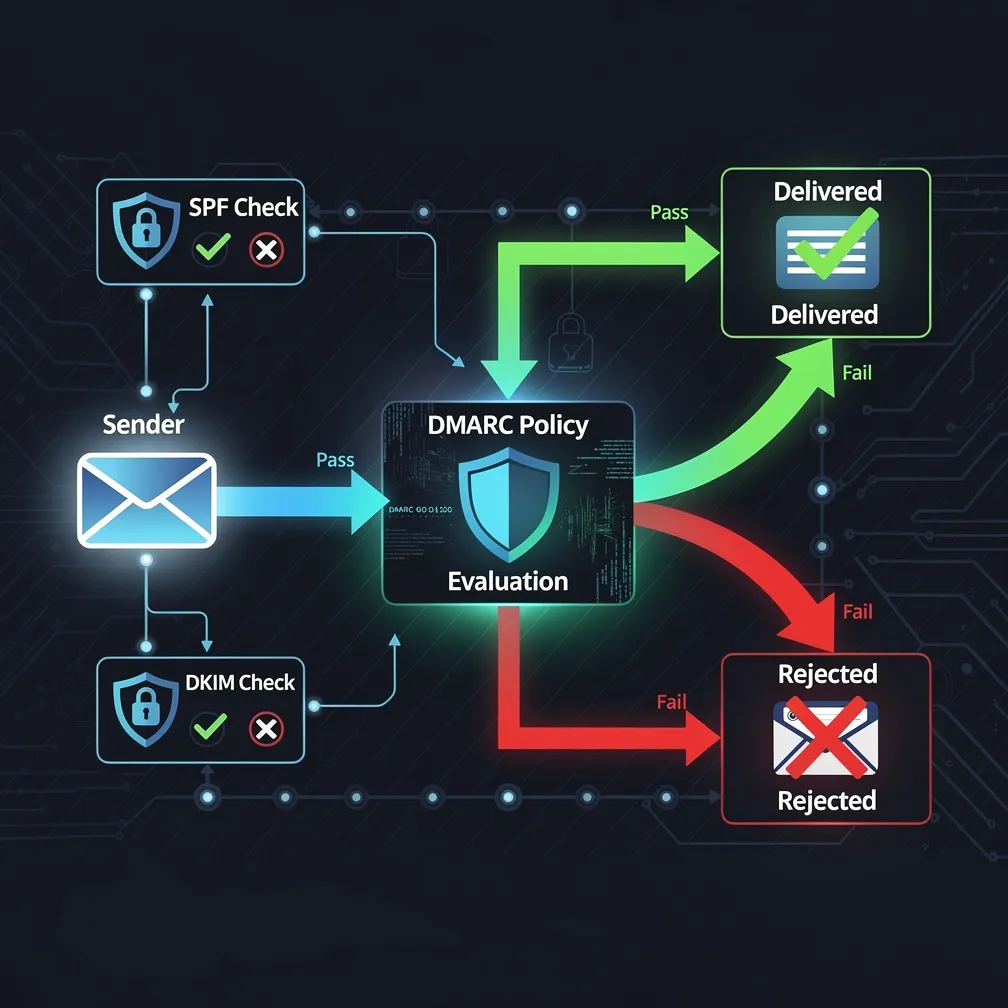
To fully grasp DMARC implementation, you need to understand how it works alongside SPF and DKIM. These three protocols form the foundation of modern email authentication, and SPF DKIM DMARC work together to verify email legitimacy.
SPF allows domain owners to specify which IP addresses and mail servers are authorized to send email on behalf of their domain. When a receiving server gets an email, it checks the SPF record published in the sender’s DNS to verify the sending server is authorized. However, SPF has limitations—it only checks the “envelope from” address and doesn’t survive email forwarding well.
DKIM adds a digital signature to email headers using cryptographic authentication. The sending server signs outgoing messages with a private key, and receiving servers verify the signature using a public key published in DNS. This proves the email hasn’t been tampered with during transit and confirms it originated from an authorized source. DKIM survives forwarding better than SPF but doesn’t directly prevent domain spoofing in the visible “From” address.
DMARC authentication builds on SPF and DKIM by adding a critical component: alignment. For an email to pass DMARC, it must pass either SPF or DKIM checks, and the authenticated domain must align with the domain shown in the “From” header—the address recipients actually see. This alignment requirement is what makes DMARC so effective at preventing domain spoofing.
Additionally, DMARC provides reporting mechanisms that send data back to domain owners about authentication results, giving unprecedented visibility into email traffic and potential abuse.
The email landscape has undergone significant changes, making DMARC implementation essential rather than optional. Here’s why your business needs DMARC email security now:
Google and Yahoo implemented mandatory sender requirements that fundamentally changed email authentication standards. Both providers now require bulk senders to implement DMARC authentication, maintain low spam complaint rates, and provide easy unsubscribe mechanisms. These requirements aren’t suggestions—emails that don’t comply face delivery problems or outright rejection.
Even if you’re not a bulk sender, implementing DMARC demonstrates email hygiene best practices and signals to receiving servers that you take email security seriously, positively impacting your email deliverability across all providers.
Phishing attacks continue to grow in sophistication, and domain spoofing remains a favorite tactic. When criminals send fraudulent emails appearing to come from your domain, they damage your brand reputation and erode customer trust. DMARC policy enforcement prevents these spoofed emails from reaching inboxes, protecting both your brand and your customers.
DMARC reporting provides detailed insights into who is sending email using your domain. These reports reveal legitimate services you may have forgotten about, shadow IT sending email without authorization, and malicious actors attempting to spoof your domain. This visibility is invaluable for maintaining security hygiene and ensuring all legitimate email sources are properly authenticated.
Proper DMARC implementation directly improves email deliverability. When receiving servers see that your domain has DMARC authentication configured with enforcement policies, they gain confidence that your emails are legitimate. This positive reputation helps ensure your important business communications reach their intended recipients rather than landing in spam folders.
When implementing DMARC, you’ll configure a DMARC policy that tells receiving servers what to do with emails that fail authentication. There are three policy levels:
This policy monitors your email authentication without affecting delivery. Emails that fail DMARC checks are still delivered normally, but you receive reports about authentication failures. This is the recommended starting point for DMARC implementation, allowing you to identify and fix authentication issues before enforcing stricter policies.
With this policy, emails that fail DMARC authentication are marked as suspicious and typically sent to the recipient’s spam or junk folder. This provides protection while reducing the risk of blocking legitimate emails if authentication isn’t perfectly configured.
The most restrictive policy instructs receiving servers to reject emails that fail DMARC authentication outright—they’re not delivered at all. This provides maximum protection against domain spoofing but requires confidence that all legitimate email sources are properly authenticated.
You can also set different policies for your primary domain and subdomains, and specify a percentage of failing emails to which the policy applies, allowing for gradual enforcement increases.
Implementing DMARC requires careful planning and a phased approach. Here’s how to do it properly:
Before creating DMARC records, identify every service and system that sends email from your domain. This includes:
DMARC authentication depends on SPF and DKIM, so ensure these are properly configured first. Create or update your SPF record to include all authorized sending sources, and configure DKIM signing for all email streams. Most modern email platforms provide documentation for DKIM setup.
Start with a monitoring policy to gather data without affecting delivery. A basic DMARC record looks like this:
v=DMARC1; p=none; rua=mailto:[email protected]; ruf=mailto:[email protected]; pct=100
This record sets the policy to “none,” specifies email addresses for aggregate and forensic reports, and applies to 100% of email.
Once your DMARC record is published, you’ll start receiving XML reports about authentication results. These reports require analysis—either manually or using DMARC analysis tools. Look for legitimate sources failing authentication and unauthorized sources attempting to use your domain.
For any legitimate email sources failing DMARC, troubleshoot and fix the underlying SPF or DKIM problems. This might involve updating SPF records, configuring DKIM signing, or working with third-party vendors to ensure proper authentication.
After monitoring for several weeks and resolving authentication issues, gradually move to enforcement. Update your policy to “quarantine” first, monitor the results, then eventually move to “reject” for maximum protection. The percentage tag allows you to apply the policy to increasingly larger portions of your email traffic.
While DMARC implementation is straightforward in concept, organizations often encounter challenges:
Complex email infrastructure: Larger organizations with numerous email-sending services may struggle to identify all sources. Thorough auditing and extended monitoring periods help address this.
Third-party vendor issues: Some vendors may not properly support SPF and DKIM authentication. You may need to work with vendors to enable proper authentication or find alternative solutions.
Report volume and complexity: DMARC reports can be overwhelming, especially for domains with high email volumes. Consider using DMARC analysis platforms that aggregate and visualize report data.
SPF record limitations: SPF has a 10-DNS-lookup limit, which organizations with many email services may exceed. Solutions include consolidating services, using DKIM instead of SPF where possible, or implementing SPF flattening techniques.
Absolutely. Domain spoofing affects businesses of all sizes, and small businesses are often targeted precisely because they’re perceived as having weaker security. DMARC implementation protects your brand and ensures email deliverability regardless of company size.
Properly implemented DMARC improves email deliverability by building sender reputation and proving your emails are legitimate. However, incorrect implementation can cause delivery issues, which is why starting with a monitoring policy and gradually increasing enforcement is crucial.
The timeline varies based on infrastructure complexity. Simple setups might achieve full enforcement in a few weeks, while complex environments with numerous email sources may require several months of monitoring and remediation before enforcing strict policies.
No. DMARC requires at least one of these authentication methods to function. Best practice is implementing both SPF and DKIM for redundancy—if one fails, the other can still pass DMARC authentication.
Email forwarding can break SPF authentication, which is why implementing DKIM is important—it survives forwarding. DMARC only requires one authentication method to pass, so properly configured DKIM ensures forwarded emails pass DMARC checks.
Email authentication through DMARC is no longer optional for businesses that depend on email communication. With evolving sender requirements from major providers and increasing sophistication of email-based attacks, implementing DMARC email security protects your brand, improves deliverability, and provides visibility into your email ecosystem.
At Email Delivery Pro, we understand that DMARC implementation can seem daunting, especially for organizations with complex email infrastructure. However, the benefits—brand protection, improved deliverability, and enhanced security—far outweigh the implementation effort.
Start your DMARC journey today by auditing your email sources and implementing monitoring mode. The insights you gain will be invaluable, and you’ll be taking a critical step toward securing your email infrastructure for 2026 and beyond. Don’t wait for a phishing incident or deliverability crisis to force your hand—proactive DMARC implementation is an investment in your organization’s security and communication reliability.